
Multi-agent workflows: a field guide
When multiple agents help, when they hurt, and how to build them well: architecture patterns, model selection, delegation contracts, permissions, and tooling — applied with OpenCode and NVIDIA OpenShell.
On this page
- 1. The state of the practice
- 1.1 Is there a de facto architecture?
- 1.2 The standards stack
- 2. Decide whether you need multiple agents
- 2.1 The complexity ladder
- 2.2 The two schools, and where they agree
- 2.3 Decision procedure
- 3. Architecture patterns
- 3.1 The canonical patterns
- 3.2 Manager or handoff?
- 3.3 Context engineering is the architecture
- 4. Choosing models for each job
- 4.1 The selection procedure
- 4.2 Role-to-model matrix
- 5. Delegating tasks
- 5.1 The delegation contract
- 5.2 Scale effort to complexity
- 5.3 Parallelize reads, serialize writes
- 6. Permissions and roles
- 6.1 Principles
- 6.2 Defense in depth
- 6.3 A role catalog
- 6.4 OWASP Top 10 for Agentic Applications: controls map
- 7. Weaving tools into workflows
- 7.1 Choosing the integration mechanism
- 7.2 Tool design rules (the agent-computer interface)
- 7.3 MCP in practice
- 8. OpenCode for multi-agent workflows
- 8.1 Concept map
- 8.2 Project layout
- 8.3 Project configuration: models, permissions, MCP
- 8.4 Agent definitions
- 8.5 Commands and skills
- 8.6 Plugins: a defense-in-depth hook
- 8.7 Headless orchestration: server, CLI, and SDK
- 8.8 CI and organization-wide governance
- 9. NVIDIA OpenShell: the runtime boundary
- 9.1 Architecture
- 9.2 Policy
- 9.3 Running OpenCode inside OpenShell
- 9.4 Multi-agent patterns with OpenShell
- 10. Reference architecture
- 11. Observability and evaluation
- 11.1 Trace everything, with standard names
- 11.2 Evaluate outcomes, not paths
- 11.3 Production reliability
- 12. Field checklist
- Architecture
- Models
- Delegation
- Permissions
- Tools
- Operations
- Sources
A field guide to the leading standards and practices for architecture, model selection, delegation, permissions, and tooling, with OpenCode and NVIDIA OpenShell.
Edition: October 2026
Audience: Engineers designing, building, or operating LLM agent systems
Versions covered: OpenCode 1.x (tested against 1.18) · OpenShell 0.1.x · MCP spec 2026-07-28 · A2A 1.0 · OWASP Agentic Top 10 (2026)
How to read: Sections 1–7 are tool-agnostic. Sections 8–10 apply them with OpenCode and OpenShell. Section 12 is a printable checklist. Bracketed numbers such as [2] refer to Sources at the end.
1. The state of the practice
1.1 Is there a de facto architecture?
No. There is no single standard architecture for multi-agent workflows, and "three-zone architecture" is not an industry standard. What the field has instead is:
- A shared pattern vocabulary. Anthropic's taxonomy [1] (prompt chaining, routing, parallelization, orchestrator-workers, evaluator-optimizer, autonomous agents) and OpenAI's manager-versus-handoff distinction [6] are the closest thing to common language. Nearly every framework implements some subset of them.
- A consensus on restraint. Every major vendor's guidance says to start with the simplest system that works, and to add agents only when evaluations prove they help [1][6][19]. Microsoft's framework documentation says: "If you can write a function to handle the task, do that instead of using an AI agent."
- A converging stack of open interfaces. These cover how agents get context (AGENTS.md, Agent Skills), reach tools (MCP), talk to other agents (A2A), and emit telemetry (OpenTelemetry GenAI). Security guidance has also converged (OWASP), and dedicated agent sandboxes such as OpenShell are emerging.
The genuine "standards" are therefore interfaces and principles, not a topology. You choose a topology per workflow, and you use the standards to make whatever you build interoperable, observable, and containable.
Where "three zones" fits. Splitting a system into control (planning, routing), execution (sandboxed workers), and governance (verification, state, audit) is a useful security lens. It mirrors classic control-plane / data-plane separation and lines up with OpenShell's gateway / sandbox / supervisor split. Use it as a way to reason about trust boundaries, not as a blueprint every workflow must follow.
1.2 The standards stack
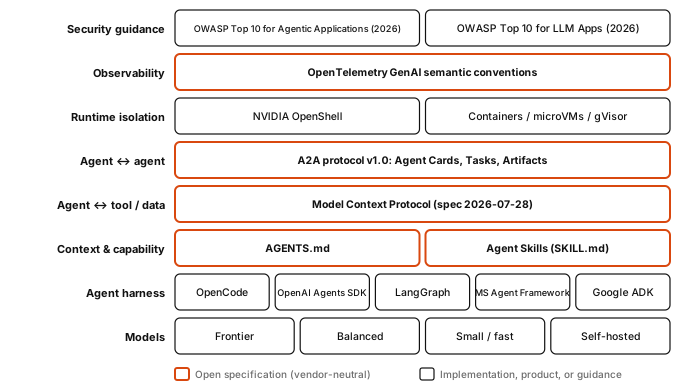
Figure 1. The layers of a modern agent system. Open specifications (accent outline) are the parts most likely to outlive any one product.
| Layer | Standard | What it standardizes | Steward and status (Oct 2026) |
|---|---|---|---|
| Agent ↔ tool / data | Model Context Protocol (MCP) [8] | Tools, resources, and prompts exposed by servers to agent hosts. Transports: stdio and Streamable HTTP. OAuth 2.1 for HTTP authorization. | Agentic AI Foundation (Linux Foundation) [18]. The 2026-07-28 spec made the protocol stateless and deprecated Sampling, Roots, and Logging. |
| Agent ↔ agent | Agent2Agent (A2A) [9] | Discovery via Agent Cards, stateful Tasks, Messages, and Artifacts between opaque agents. JSON-RPC, gRPC, and REST bindings. | Linux Foundation, and an AAIF project since Aug 2026. v1.0 released. |
| Project context | AGENTS.md [10] | A Markdown "README for agents" with build, test, and convention instructions. | AAIF. Supported by OpenCode, Codex, Cursor, Copilot, Gemini CLI, and others. |
| Capabilities | Agent Skills (SKILL.md) [11] | Folders of instructions, scripts, and assets, loaded by progressive disclosure. | Open format originated by Anthropic. Adopted by OpenCode, Claude Code, Codex, Copilot, and others. |
| Observability | OpenTelemetry GenAI semantic conventions [12] | Span and attribute names such as invoke_agent, execute_tool, and gen_ai.usage.*. | OpenTelemetry. Status is "Development", so names may still change. |
| Security | OWASP Top 10 for Agentic Applications (2026) [14] and OWASP Top 10 for LLM Applications (2026) [13] | Threat taxonomies and mitigations, including the "least agency" principle. | OWASP GenAI Security Project. |
MCP or A2A? MCP connects an agent to capabilities (a tool, a database, a file system). A2A connects an agent to another agent that has its own reasoning and keeps its internals private. The A2A spec states explicitly that it is not a sub-agent or tool-call protocol and not a replacement for MCP [9]. Inside one harness such as OpenCode, subagents are neither. They are internal delegation.
2. Decide whether you need multiple agents
2.1 The complexity ladder
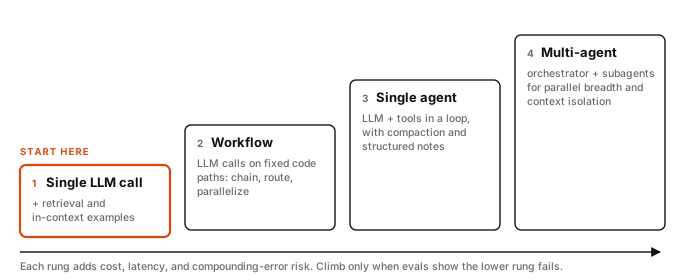
Figure 2. Anthropic distinguishes workflows ("LLMs and tools orchestrated through predefined code paths") from agents ("LLMs dynamically direct their own processes and tool usage") [1].
2.2 The two schools, and where they agree
Two widely cited posts were published a day apart in June 2025:
- For multi-agent: Anthropic's research system [2]. An Opus lead agent with Sonnet subagents beat single-agent Opus by 90.2% on Anthropic's internal research evaluation. On BrowseComp, three factors explained 95% of performance variance, and token usage alone explained 80%. "Multi-agent systems work mainly because they help spend enough tokens to solve the problem."
- Against multi-agent: Cognition's "Don't Build Multi-Agents" [5]. It sets two principles: "Share context, and share full agent traces, not just individual messages" and "Actions carry implicit decisions, and conflicting decisions carry bad results." Its default recommendation is a single-threaded linear agent.
They agree on the failure condition. Anthropic writes that multi-agent systems fit poorly in domains "that require all agents to share the same context or involve many dependencies between agents," and that "most coding tasks involve fewer truly parallelizable tasks than research" [2].
| Multi-agent tends to help when… | Multi-agent tends to hurt when… |
|---|---|
| Work is breadth-first and splits into independent parts (research, audits, broad search) | Subtasks make interdependent decisions (one design, one codebase area) |
| The information exceeds a single context window | All workers need the same evolving context |
| Many distinct tool sets would overload one agent's prompt | The task is small. Anthropic's early failure mode was "spawning 50 subagents for simple queries" [2] |
| Value per task justifies the cost: agents use ~4× and multi-agent systems ~15× the tokens of chat [2] | Latency or cost budgets are tight |
2.3 Decision procedure
flowchart TD
  A([New task]) --> B["Can one call with retrieval do it?"]
  B -- yes --> B1([Single LLM call])
  B -- no --> C["Are the steps known in advance?"]
  C -- yes --> C1([Workflow: chain, route, parallelize])
  C -- no --> D["Needs more than one context window,<br/>parallel breadth, or many tool sets?"]
  D -- no --> D1([Single agent + compaction + notes])
  D -- yes --> E["Do subtasks share context or make<br/>interdependent decisions?"]
  E -- yes --> D1
  E -- no --> F["Worth roughly 15x the token cost of chat?"]
  F -- no --> D1
  F -- yes --> G([Orchestrator-workers, behind evals]):::accent
  classDef accent fill:#D9480F,stroke:#D9480F,color:#ffffff
Figure 3. Choose the lowest rung that satisfies the task. Most production systems are workflows or single agents with a few read-only subagents.
3. Architecture patterns
3.1 The canonical patterns
flowchart TB
  subgraph P1["1 · Prompt chaining: fixed steps with programmatic gates"]
    direction LR
    a1([In]) --> a2[LLM step 1] --> a3{Gate} -- pass --> a4[LLM step 2] --> a5([Out])
    a3 -- fail --> a6([Stop])
  end
  subgraph P2["2 · Routing: classify, then specialize"]
    direction LR
    b1([In]) --> b2[Router]:::accent
    b2 --> b3[Specialist A]
    b2 --> b4[Specialist B]
    b2 --> b5[Specialist C]
  end
  subgraph P3["3 · Parallelization: sectioning or voting"]
    direction LR
    c1([In]) --> c2[LLM] & c3[LLM] & c4[LLM]
    c2 & c3 & c4 --> c5[Aggregate] --> c6([Out])
  end
  subgraph P4["4 · Orchestrator-workers: subtasks decided at runtime"]
    direction LR
    d1([In]) --> d2[Orchestrator]:::accent
    d2 --> d3[Worker] & d4[Worker] & d5[Worker]
    d3 & d4 & d5 --> d6[Synthesize] --> d7([Out])
  end
  subgraph P5["5 · Evaluator-optimizer: generate, critique, revise"]
    direction LR
    e1([In]) --> e2[Generator] --> e3[Evaluator]:::accent
    e3 -- feedback --> e2
    e3 -- accept --> e4([Out])
  end
  P1 ~~~ P2 ~~~ P3 ~~~ P4 ~~~ P5
  classDef accent fill:#D9480F,stroke:#D9480F,color:#ffffff
Figure 4. The five workflow patterns from Anthropic's "Building effective agents" [1]. An autonomous agent is an LLM using tools in a loop with environmental feedback and a stopping condition.
| Pattern | Use when | Watch out for | Typical control |
|---|---|---|---|
| Prompt chaining | The task decomposes into fixed, ordered steps | Early errors propagating downstream | Deterministic gate (schema, tests, lint) between steps |
| Routing | Inputs fall into distinct classes that need different prompts, tools, or models | Misroutes to dead ends | Confidence threshold with a fallback route or a human |
| Parallelization | Independent sections, or several votes improve confidence | Aggregation conflicts, cost | Run guardrails as a separate parallel call, which "tends to perform better" than one combined call [1] |
| Orchestrator-workers | Subtasks are not known in advance | Over-delegation, duplicate work, conflicting edits | Delegation contract (§5), effort budgets, one writer per area |
| Evaluator-optimizer | Clear criteria exist and feedback measurably improves output | Endless loops, a judge that shares the generator's blind spots | Cap iterations, and use a different model or deterministic checks as the judge |
3.2 Manager or handoff?
OpenAI names the two multi-agent control styles [6][7]:
flowchart LR
  subgraph M["Manager: agents as tools"]
    direction TB
    u1([User]) <--> m[Manager]:::accent
    m -- tool call --> s1[Specialist A]
    m -- tool call --> s2[Specialist B]
  end
  subgraph H["Decentralized: handoffs"]
    direction TB
    u2([User]) <--> t[Triage]
    t -- handoff --> h1[Specialist A]
    h1 -- handoff --> h2[Specialist B]
  end
  M ~~~ H
  classDef accent fill:#D9480F,stroke:#D9480F,color:#ffffff
Figure 5. Manager versus handoff. In OpenCode, the Task tool (primary agent → subagent) is the manager pattern. Switching primary agents with Tab is a human-driven handoff.
- Manager (agents as tools). One agent keeps control and talks to the user. Specialists return results to it. Choose this by default: it is easier to observe, budget, and secure.
- Handoff. "A one way transfer" [6]. The specialist takes over the conversation. Use it for triage-style front doors where a specialist should own the rest of the interaction.
3.3 Context engineering is the architecture
Most multi-agent design decisions are really decisions about context, meaning which tokens each model sees [3]:
- Isolate exploration. Each subagent may burn "tens of thousands of tokens or more" but should return "only a condensed, distilled summary of its work (often 1,000–2,000 tokens)" [3].
- Pass references, not payloads. Have subagents write large outputs to files and return paths. This avoids a "game of telephone" [2].
- Persist the plan outside the context window. Anthropic's lead agent saves its plan to memory because context beyond 200k tokens is truncated [2]. Use structured notes (a plan file,
NOTES.md, a todo list) for long tasks [3]. - Compact deliberately. Summarize history when you approach limits. Tune the summarizer for recall first, then precision [3].
- Load just in time. Keep identifiers in context (file paths, URLs, IDs) and fetch content through tools when needed [3].
4. Choosing models for each job
4.1 The selection procedure
OpenAI's guidance is to build the prototype "with the most capable model for every task to establish a performance baseline," then try smaller models where evaluations allow [6]. Combined with Anthropic's evaluation advice [2], the procedure is:
- Baseline. Run every role on the most capable model you can access.
- Build a small evaluation set. About 20 realistic tasks is enough to start, because early changes produce large swings ("30% to 80%") [2]. Grade end state, not the path taken.
- Downgrade one role at a time. Keep each downgrade only if the evaluation still passes. Start with high-volume, low-judgment roles.
- Tune reasoning effort per role before switching model families. In OpenCode these are model variants such as
highormax. - Re-run on every model release. A model upgrade can matter more than budget: upgrading to Sonnet 4 beat doubling the token budget on Sonnet 3.7 [2].
Cost model. Token spend dominates, and it multiplies with fan-out. Estimate per workflow as Σ over roles of (calls × average tokens per call × price). Then cap it with per-agent step limits (§8.3). Measure; do not guess. Anthropic found token usage explained 80% of performance variance [2], so a cheaper configuration that fails the evaluation is not cheaper.
4.2 Role-to-model matrix
| Role | What it needs most | Recommended tier | Notes |
|---|---|---|---|
| Orchestrator / planner | Decomposition, judgment, synthesis over long horizons | Frontier, high reasoning effort | Few calls, high leverage. Anthropic pairs an Opus lead with Sonnet workers [2]. |
| Implementer (writes code or content) | Reliable tool use, instruction following, domain skill | Frontier or strong balanced | The quality bottleneck for code. Downgrade last. |
| Explorer / researcher (read-only search) | Speed, cheap parallelism, decent summarization | Small / fast | High volume. OpenCode's built-in explore agent exists for this. |
| Router / classifier | Structured output, low latency | Small / fast | Pair with a confidence threshold and fallback. |
| Reviewer / judge | Independent, critical reasoning | Strong, ideally a different model family from the generator | Reduces correlated blind spots. Back it with deterministic checks (tests, linters). |
| Guardrail classifier | Fast, consistent screening | Small / fast, or a dedicated safety model | Run it in parallel with the main call [1][7]. |
| Summarizer / compaction / titles | Faithful compression | Small / fast | OpenCode's small_model covers titles. Compaction is a hidden built-in agent. |
| Sensitive-data processing | Data residency | Self-hosted or private endpoint | Bind credentials so only this role can reach the endpoint (see §9). |
5. Delegating tasks
5.1 The delegation contract
Anthropic found that vague delegation caused duplicated work and gaps. Its rule: "Each subagent needs an objective, an output format, guidance on the tools and sources to use, and clear task boundaries" [2]. Treat every handoff as a contract. Add acceptance criteria and a budget:
OBJECTIVE    One sentence. What decision or artifact this enables.
CONTEXT      Only what is needed. Paths, IDs, and links, not pasted content.
SCOPE        In scope / out of scope. Files or systems you may touch.
TOOLS        Which tools and sources to use; which to avoid.
OUTPUT       Exact format (schema or headings), max ~300 words. Large
             artifacts: write to <path> and return the path.
DONE WHEN    Verifiable acceptance criteria (tests pass, N sources cited...).
BUDGET       Max steps / tool calls. If blocked or ambiguous, stop and
             return questions instead of guessing.
5.2 Scale effort to complexity
| Query complexity | Agents | Tool calls per agent | Source |
|---|---|---|---|
| Simple fact-finding | 1 | 3–10 | [2] |
| Direct comparison | 2–4 subagents | 10–15 each | [2] |
| Complex research | 10+ subagents, clearly divided | Varies | [2] |
Put these rules in the orchestrator's prompt explicitly. Models are poor at judging appropriate effort without guidance [2].
5.3 Parallelize reads, serialize writes
sequenceDiagram
  autonumber
  participant H as Human
  participant O as Orchestrator
  participant E as Explorers
  participant I as Implementer
  participant R as Reviewer
  H->>O: Goal + criteria
  Note over O: Write plan file
  par Parallel discovery
    O->>E: Map module A
  and
    O->>E: Map module B
  end
  E-->>O: Summaries + paths
  O->>I: Brief for step 1
  I-->>O: Diff + test results
  O->>R: Review brief
  R-->>O: Findings (JSON)
  alt Blockers (max 2 loops)
    O->>I: Fix findings
  else Approved
    O->>H: Result + approval request
  end
Figure 6. A typical coding workflow. The orchestrator runs on a frontier model; explorers are small and read-only; the implementer has scoped edit rights; the reviewer is read-only and from another model family. Reads fan out in parallel. Writes go through one implementer at a time, because "actions carry implicit decisions" [5].
- One writer per area. Never let two agents edit overlapping files concurrently. If you need parallel writers, give each its own git worktree or sandbox and merge deliberately.
- Fan out reads freely. Search, analysis, and review parallelize well [2].
- Return structured results. Use JSON Schema output where the harness supports it (OpenCode SDK: §8.7). Downstream steps should never parse prose.
- Bound every loop. Set step limits per agent, a maximum number of review iterations, and a stopping condition [1].
- Escalate on thresholds. Hand off to a human when failure thresholds are exceeded or before high-risk actions that are "sensitive, irreversible, or have high stakes" [6].
6. Permissions and roles
6.1 Principles
- Least agency. "Avoid unnecessary autonomy; deploying agentic behavior where it is not needed expands the attack surface without adding value" [14].
- Enforce outside the model. Prompts are advisory. Permissions, sandboxes, and downstream authorization are enforced. OWASP calls the last of these "complete mediation" [13].
- Deny by default, allow narrowly. Allow specific commands, paths, hosts, and tools, not categories.
- Break the lethal trifecta per agent (Figure 7).
- Separate identities. Each role gets its own credentials, scoped to its job (OWASP ASI03, Identity and Privilege Abuse [14]).
- Humans approve the irreversible. Pushes, deploys, payments, deletions, and external messages.
- Treat everything an agent reads as untrusted. That includes other agents' outputs (ASI07, Insecure Inter-Agent Communication).
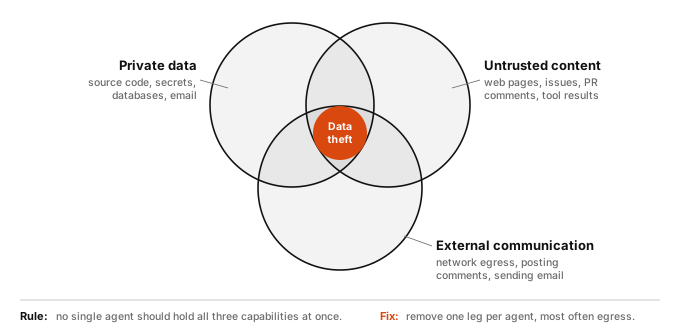
Figure 7. Simon Willison's "lethal trifecta" [15]: "If your agent combines these three features, an attacker can easily trick it into accessing your private data and sending it to that attacker." LLMs "are unable to reliably distinguish the importance of instructions based on where they came from."
6.2 Defense in depth
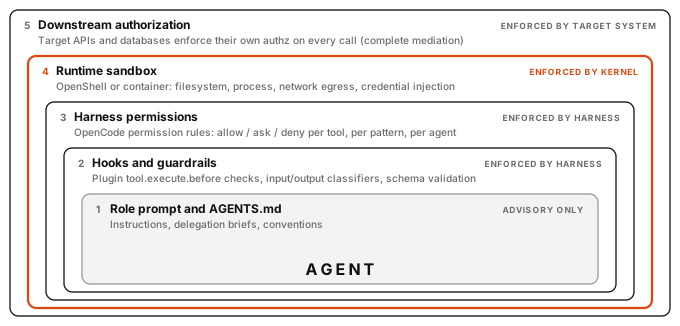
Figure 8. Five layers of control. Only layer 1 depends on the model's cooperation. Design so that a fully compromised agent is still contained by layers 3–5.
6.3 A role catalog
| Role | Reads | Writes | Shell | Network egress | Delegates | Trifecta legs held |
|---|---|---|---|---|---|---|
| Orchestrator | Repo | Plan files only | Read-only git | None | Allowed subagents only | Private data |
| Explorer | Repo | None | None (grep/glob) | None | No | Private data |
| Researcher | None or public docs | Notes only | None | Allow-listed doc hosts | No | Untrusted content + egress (no private data) |
| Implementer | Repo | Scoped source and test paths | Test, lint, build | Package registry (read-only) | No | Private data (+ registry content) |
| Reviewer | Repo, diff | None | Tests, git diff | None | No | Private data |
| Releaser | Repo | None | git push, deploy (ask) | Git host, CI | No | Human-gated: all three |
6.4 OWASP Top 10 for Agentic Applications: controls map
| ID | Risk [14] | Primary controls in this guide |
|---|---|---|
| ASI01 | Agent Goal Hijack | Untrusted-content isolation, the trifecta rule, human approval for consequential actions |
| ASI02 | Tool Misuse and Exploitation | Per-agent tool allow-lists, bash and path patterns, MCP tool-level rules |
| ASI03 | Identity and Privilege Abuse | Per-role credentials, OpenShell provider binding, no shared tokens |
| ASI04 | Agentic Supply Chain Vulnerabilities | Pin MCP servers, plugins, and skills; review third-party skills like code |
| ASI05 | Unexpected Code Execution (RCE) | Run in a sandbox (Landlock and seccomp), never on the host for untrusted work |
| ASI06 | Memory and Context Poisoning | Treat retrieved content and notes as data, provenance on memory writes |
| ASI07 | Insecure Inter-Agent Communication | Structured outputs, validate between agents, authenticated A2A |
| ASI08 | Cascading Failures | Gates between steps, iteration caps, doom_loop detection, circuit breakers |
| ASI09 | Human-Agent Trust Exploitation | Show evidence (diffs, tests) at approval time, not just summaries |
| ASI10 | Rogue Agents | Kill switches (session.abort, sandbox stop), audit logs, global policies |
7. Weaving tools into workflows
7.1 Choosing the integration mechanism
| Mechanism | Best for | Context cost | Permission granularity | Notes |
|---|---|---|---|---|
| Existing CLI via shell | Mature CLIs (git, gh, kubectl, test runners) | Low: no schema in the prompt | Command patterns ("git diff*": allow) | Usually the simplest. Document the commands in AGENTS.md. |
| Agent Skill (SKILL.md) | Procedures, conventions, scripted workflows | Very low until loaded (progressive disclosure [11]) | Per-skill allow/ask/deny | Portable across harnesses. |
| MCP server | Systems without a good CLI; remote SaaS with OAuth; shared org tools | Medium to high: every tool schema sits in context | Per-tool (server_* patterns); OpenShell protocol: mcp rules | OpenCode warns that some servers (e.g. GitHub's) "can easily exceed the context limit." |
| Custom tool / plugin | Tight, typed operations unique to your codebase | Low | Per-tool | Can override built-ins. Version it with the repo. |
| A2A remote agent | Delegating to another team's or vendor's agent | Low (task-level) | Agent Card auth schemes | Cross-boundary delegation, not in-process subagents. |
7.2 Tool design rules (the agent-computer interface)
Anthropic's tool-design guidance [1][4]:
- Build fewer, higher-level tools. Prefer
search_contactsoverlist_contacts, and consolidate common chains. "More tools don't always lead to better outcomes." - Namespace consistently, e.g.
jira_searchandasana_search. - Return high-signal context. Resolve UUIDs to names, offer a
concise/detailedresponse format, and paginate and truncate with sensible defaults. - Write actionable errors that tell the agent how to fix the call.
- Poka-yoke the arguments. Requiring absolute file paths eliminated a whole class of errors in Anthropic's SWE-bench agent, where the team "spent more time optimizing our tools than the overall prompt."
- Evaluate tools with the model. A tool-testing agent that rewrote descriptions cut task completion time by 40% [2].
7.3 MCP in practice
- Scope servers per agent. Disable them globally and enable them only for the agents that need them, to save context and reduce blast radius (§8.3).
- Prefer remote servers with OAuth 2.1 for SaaS systems. The spec requires PKCE and audience-bound tokens. Local stdio servers take credentials from the environment instead [8].
- Treat tool annotations as untrusted unless the server is trusted, because "tools represent arbitrary code execution" [8]. OpenShell can also limit an MCP endpoint to named tools (§9.2).
8. OpenCode for multi-agent workflows
OpenCode is an open-source agent harness with a terminal UI, a desktop app, a headless server, and an SDK. Its multi-agent model is primary agents that delegate to subagents through the Task tool. Each subagent runs in its own child session [16].
Version note. This section documents the OpenCode 1.x configuration schema (
opencode.ai/docs), which is what OpenCode 1.18 uses. OpenCode v2 renames several keys:agent→agents,permission→permissions,bash→shell,task→subagent, andprompt→system. Check which schema your installed version expects.
8.1 Concept map
flowchart LR
  C([TUI · run · SDK · GitHub]) --> P
  R[AGENTS.md + instructions] -. loaded into .-> P
  subgraph S["opencode server"]
    direction LR
    P[Primary agent<br/>build · plan · custom]:::accent
    P -- "Task tool" --> A1[Subagent<br/>child session]
    P -- "Task tool" --> A2[Subagent<br/>child session]
    P -. "skill()" .-> SK[Agent Skills]
    A1 --> T[Built-in tools<br/>read · edit · bash · grep]
    A2 --> MC[MCP tools<br/>server_*]
    PE{{Permission engine<br/>allow · ask · deny}} -. gates .-> T
    PE -. gates .-> MC
    PE -. "gates (permission.task)" .-> A1
    PL[Plugins<br/>tool.execute hooks] -. hooks .-> T
  end
  classDef accent fill:#D9480F,stroke:#D9480F,color:#ffffff
Figure 9. OpenCode's moving parts. The TUI is itself a client of the same server that the SDK and opencode run --attach use.
| Concept | What it is | Key config |
|---|---|---|
| Primary agent | The agent you talk to; switch with Tab. Built-ins: build (all tools) and plan (edits and bash set to ask). | mode: primary, default_agent |
| Subagent | Invoked by a primary agent via the Task tool, or by you with @name. Built-ins: general (parallel units of work) and explore (fast, read-only). | mode: subagent, description |
| Child session | Each subagent's isolated context. Navigate with session_child_first, session_child_cycle, and session_parent. | (none) |
| Delegation control | Which subagents an agent may call. Nesting depth defaults to 1 (subagents cannot spawn subagents). | permission.task, subagent_depth |
| Per-agent model | Unset subagents inherit the invoking primary agent's model. | model, small_model, variants |
| Step limit | Max agentic iterations, after which the agent is told to summarize and stop. | steps (maxSteps is deprecated) |
8.2 Project layout
repo/
├── AGENTS.md                  # project rules: build, test, conventions (/init creates it)
├── opencode.json              # models, global permissions, MCP, defaults
└── .opencode/
    ├── agents/
    │   ├── orchestrator.md    # primary: plans and delegates, cannot edit source
    │   ├── implementer.md     # subagent: scoped edits + tests
    │   └── reviewer.md        # subagent: read-only, different model family
    ├── commands/
    │   ├── feature.md         # /feature <request>
    │   └── review.md          # /review <criteria>, runs as a subtask
    ├── skills/
    │   └── delegation-brief/
    │       └── SKILL.md       # the delegation contract from §5.1
    └── plugins/
        └── guard.ts           # defense-in-depth hook
Directory names are plural (agents/, commands/, skills/, plugins/). Singular names still load for backwards compatibility [16].
8.3 Project configuration: models, permissions, MCP
opencode.json
{
  "$schema": "https://opencode.ai/config.json",
  "model": "anthropic/claude-sonnet-4-5",
  "small_model": "anthropic/claude-haiku-4-5",
  "default_agent": "orchestrator",
  "subagent_depth": 1,
  "share": "disabled",
  "permission": {
    "read": { "*": "allow", "*.env": "deny", "*.env.*": "deny", "*.env.example": "allow" },
    "bash": {
      "*": "ask",
      "git status*": "allow",
      "git diff*": "allow",
      "git log*": "allow",
      "git push *": "deny",
      "rm -rf *": "deny"
    },
    "external_directory": "deny",
    "tracker_*": "deny"
  },
  "agent": {
    "explore": { "model": "anthropic/claude-haiku-4-5" }
  },
  "mcp": {
    "tracker": {
      "type": "remote",
      "url": "https://mcp.example.internal/tracker",
      "headers": { "Authorization": "Bearer {env:TRACKER_TOKEN}" }
    }
  }
}
Rules to know [16]:
- The last matching rule wins. Put the
"*"catch-all first, then the specific rules. - Agent rules merge with global rules and take precedence.
- Permission keys match tool names as wildcards.
"tracker_*": "deny"hides every tool from thetrackerMCP server; the reviewer re-enables it below. The MCP docs show this per-agent scoping with the deprecatedtoolskey; thepermissionform shown here is the current equivalent. - Built-in protections.
doom_loop(the same tool call repeated 3 times with identical input) andexternal_directorydefault toask..envfiles are denied for reading by default. --automode approves anything not explicitly denied. Yourdenyrules are your floor.- Model IDs are illustrative. They follow OpenCode's own documentation examples, and newer models will exist. Pick by tier (§4.2) and substitute the identifiers your providers expose;
opencode modelslists them, e.g.google-vertex/...when using Vertex AI. A cross-family reviewer needs that second provider configured.
8.4 Agent definitions
Orchestrator: a primary agent that plans and delegates, and cannot edit source.
.opencode/agents/orchestrator.md
---
description: Plans multi-step changes, delegates to specialist subagents, and verifies results.
mode: primary
model: anthropic/claude-opus-4-5
temperature: 0.2
steps: 60
permission:
  edit:
    "*": deny
    ".plans/**": allow
  webfetch: deny
  bash:
    "*": deny
    "git status*": allow
    "git diff*": allow
    "git log*": allow
  skill:
    "*": deny
    "delegation-brief": allow
  task:
    "*": deny
    "explore": allow
    "implementer": allow
    "reviewer": allow
---
You coordinate; you do not edit source files.
1. Restate the goal and acceptance criteria. Write the plan to .plans/<slug>.md.
2. Load the delegation-brief skill. Every delegation uses that contract.
3. Discovery: launch 1 explore subagent for a narrow question, 2-4 in parallel
   for cross-cutting ones. Never more than 5.
4. Implementation: one implementer at a time, one bounded step per brief.
   Never give two briefs overlapping files.
5. Send each diff to reviewer. At most 2 fix loops, then report to the human.
6. Finish with: what changed, evidence (test output), open risks.
   Ask before anything irreversible.
Implementer: a scoped writer that runs only tests, lint, and typecheck.
.opencode/agents/implementer.md
---
description: Implements one bounded, fully specified change and runs its tests. Requires a complete brief.
mode: subagent
model: anthropic/claude-sonnet-4-5
temperature: 0.1
steps: 40
permission:
  edit:
    "*": deny
    "src/**": allow
    "tests/**": allow
  bash:
    "*": ask
    "npm test*": allow
    "npm run lint*": allow
    "npm run typecheck*": allow
    "git diff*": allow
    "git commit *": deny
    "git push *": deny
  webfetch: deny
  task: deny
---
Make the smallest change that satisfies DONE WHEN. Stay inside SCOPE.
If the brief is ambiguous, stop and return questions; do not guess.
Return: summary (max 200 words), files changed, test command and result.
Reviewer: read-only, on a different model family from the implementer.
.opencode/agents/reviewer.md
---
description: Reviews a diff against acceptance criteria for correctness, security, and tests. Read-only.
mode: subagent
model: openai/gpt-5
temperature: 0.1
permission:
  edit: deny
  webfetch: deny
  task: deny
  bash:
    "*": deny
    "git diff*": allow
    "git log*": allow
    "npm test*": allow
  "tracker_*": allow
---
Review only what you are given. For each finding return:
severity (blocker | major | minor), file:line, issue, suggested fix.
Approve only when there are no blockers. Never modify files.
8.5 Commands and skills
Commands package repeatable entry points. With subtask: true, the command runs as a subagent and keeps its work out of your primary context [16].
.opencode/commands/review.md · invoked as /review <criteria>
---
description: Independent review of uncommitted changes
agent: reviewer
subtask: true
---
Acceptance criteria: $ARGUMENTS

Uncommitted changes:
!`git diff`
.opencode/commands/feature.md · invoked as /feature <request>
---
description: Plan, implement, and review a feature end to end
agent: orchestrator
---
Feature request: $ARGUMENTS

Working tree:
!`git status --short`

Follow your procedure. Stop for approval before any commit.
Skills package procedures that load only when needed. name must match the folder name and the pattern ^[a-z0-9]+(-[a-z0-9]+)*$ [16][11].
.opencode/skills/delegation-brief/SKILL.md
---
name: delegation-brief
description: Contract and checklist for writing subagent briefs. Load before delegating any task.
---
Every brief MUST contain these headings:
OBJECTIVE, CONTEXT (paths, not pasted content), SCOPE (in/out, files allowed),
TOOLS, OUTPUT (format, max 300 words, large artifacts written to a path),
DONE WHEN (verifiable), BUDGET (max steps; stop and ask if blocked).
Before sending, check for: overlap with other in-flight briefs, missing acceptance criteria,
and any request that needs a capability the target agent lacks.
8.6 Plugins: a defense-in-depth hook
Plugins register hooks such as tool.execute.before, tool.execute.after, and permission.ask, and they receive bus events such as session.idle [16]. The hook and event names here were type-checked against @opencode-ai/plugin 1.18. Some docs pages list a permission.asked event, which that version does not define. Use them for audit logging, notifications, and extra checks. They are not a security boundary: string matching is bypassable, so the sandbox (§9) is the real boundary.
.opencode/plugins/guard.ts
import type { Plugin } from "@opencode-ai/plugin"

export const Guard: Plugin = async () => ({
  "tool.execute.before": async (input, output) => {
    if (input.tool === "read" && String(output.args.filePath).includes(".env")) {
      throw new Error("Blocked by policy: do not read .env files")
    }
    if (input.tool === "bash" && /\b(curl|wget)\b/.test(String(output.args.command))) {
      throw new Error("Blocked by policy: use approved tools for network access")
    }
  },
  "permission.ask": async (input, output) => {
    // Runs when a rule resolves to "ask". You may tighten the outcome here
    // (output.status = "deny") or notify a human via chat or pager.
  },
  event: async ({ event }) => {
    if (event.type === "session.idle") {
      // e.g. post a completion notice with a link to the session
    }
  },
})
8.7 Headless orchestration: server, CLI, and SDK
Run one long-lived server and attach clients to it. This avoids MCP cold starts on every run [16].
# one server (set OPENCODE_SERVER_PASSWORD if exposed beyond localhost)
opencode serve --hostname 127.0.0.1 --port 4096

# scripted runs against it
opencode run --attach http://127.0.0.1:4096 --agent orchestrator "Add rate limiting to /login"
opencode run --attach http://127.0.0.1:4096 --command review "criteria in docs/spec.md"
To fan out from code, use the SDK and require structured output, so results feed the next step without prose parsing. JSON-Schema output is exposed on the @opencode-ai/sdk/v2 client, and the parsed result arrives in info.structured:
scripts/parallel-review.ts
import { createOpencodeClient } from "@opencode-ai/sdk/v2"

const client = createOpencodeClient({ baseUrl: "http://127.0.0.1:4096" })

const reviewSchema = {
  type: "object",
  properties: {
    approved: { type: "boolean" },
    findings: {
      type: "array",
      items: {
        type: "object",
        properties: {
          severity: { type: "string", enum: ["blocker", "major", "minor"] },
          location: { type: "string" },
          issue: { type: "string" },
        },
        required: ["severity", "location", "issue"],
      },
    },
  },
  required: ["approved", "findings"],
}

const areas = ["packages/api", "packages/web", "packages/worker"]

const results = await Promise.all(
  areas.map(async (dir) => {
    const { data: session } = await client.session.create({ title: `review ${dir}` })
    if (!session) throw new Error(`could not create session for ${dir}`)
    const { data } = await client.session.prompt({
      sessionID: session.id,
      agent: "reviewer",
      format: { type: "json_schema", schema: reviewSchema, retryCount: 2 },
      parts: [{ type: "text", text: `Review uncommitted changes under ${dir}.` }],
    })
    return { dir, review: data?.info.structured }
  }),
)

const blockers = results.filter((r: any) => r.review && !r.review.approved)
console.log(JSON.stringify({ results, blocked: blockers.length > 0 }, null, 2))
Other server capabilities useful for orchestration: list child sessions (GET /session/:id/children), abort a run (POST /session/:id/abort), answer permission prompts remotely (POST /session/:id/permissions/:permissionID), and stream all events (GET /event, SSE). The OpenAPI spec is served at /doc [16].
8.8 CI and organization-wide governance
GitHub. opencode github install sets up the app and the workflow. In a workflow, the action is anomalyco/opencode/github@latest. It requires model, and agent must name a primary agent [16].
.github/workflows/opencode.yml (step)
- uses: anomalyco/opencode/github@latest
  env:
    ANTHROPIC_API_KEY: ${{ secrets.ANTHROPIC_API_KEY }}
  with:
    model: anthropic/claude-sonnet-4-5
    agent: orchestrator
    share: false   # sharing defaults to true on public repositories
Managed configuration has the highest precedence and cannot be overridden by users or projects. Put opencode.json in /Library/Application Support/opencode/ (macOS), /etc/opencode/ (Linux), or %ProgramData%\opencode (Windows), or deploy it through MDM (ai.opencode.managed). Use it to enforce share: "disabled", baseline deny rules, and provider allow-lists (enabled_providers, or the experimental experimental.policies with provider.use). Verify the result with opencode debug config [16].
9. NVIDIA OpenShell: the runtime boundary
OpenShell is NVIDIA's open-source (Apache-2.0) "safe, private runtime for fleets of autonomous AI agents." It was announced at GTC in March 2026, and 0.1.0 shipped in September 2026 [17]. It runs an unmodified agent such as OpenCode, Claude Code, or Codex inside a sandbox, and enforces a declarative policy at the kernel and network layers. Its documentation uses OpenCode as the first-agent example.
Maturity. OpenShell is pre-1.0 (0.1.x) with a stable release cadence. It requires Linux, macOS on Apple Silicon, or WSL 2 (experimental), plus Docker, Podman, or host virtualization. The privacy router and
openshell inferencecommands from early announcements have been removed; model access now goes through provider profiles [17].
9.1 Architecture
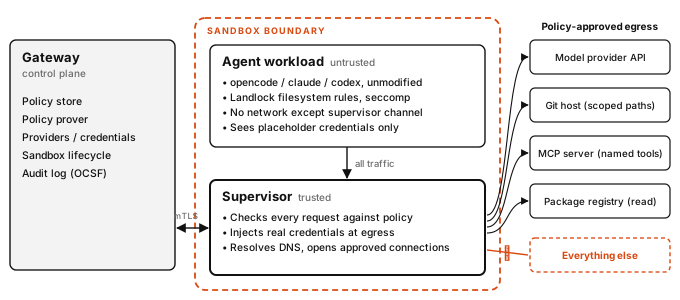
Figure 10. The gateway is the control plane. The supervisor is the trusted side of the boundary and checks every connection. The agent sees only placeholder credentials; real secrets are injected at egress, and only to endpoints the credential is bound to [17].
| Component | Role |
|---|---|
| Gateway | Control plane: sandbox lifecycle, policy delivery, providers, authorization, the policy prover, and audit (OCSF). |
| Supervisor | Trusted enforcement point. Evaluates each request, injects credentials, resolves DNS, and opens approved connections. |
| Sandbox | Runs the agent as a non-root child process with Landlock filesystem rules and seccomp. It has no network except the channel to the supervisor. |
| Provider profile | Credentials, endpoints, and the executable paths allowed to use them. |
| Policy prover | Formal verification that flags risky new access (e.g. credential_reach_expansion) before a change is approved. |
| Policy advisor | Drafts narrow rules from denials for human (or automatic) approval. An agent can never approve its own request. |
9.2 Policy
Policies are YAML (version: 1), deny by default, and deny rules beat allow rules. Network rules bind endpoints to the binaries allowed to reach them, and they hot-reload. Filesystem and process settings apply at creation [17].
policy.yaml
version: 1

filesystem_policy:
  include_workdir: true
  read_only: [/usr, /lib, /etc]
  read_write: [/tmp]

landlock:
  compatibility: best_effort

process:
  run_as_user: "1500"
  run_as_group: "1500"

network_policies:
  github_repo_api:
    endpoints:
      - host: api.github.com
        port: 443
        protocol: rest
        enforcement: enforce          # default is audit
        rules:
          - allow: { method: "*", path: "/repos/<org>/<repo>/**" }
        deny_rules:
          - method: "*"
            path: "/repos/<org>/<repo>/hooks/**"
    binaries:
      - path: /usr/bin/gh
  npm_registry:
    endpoints:
      - host: registry.npmjs.org
        port: 443
        protocol: rest
        enforcement: enforce
        access: read-only
    binaries:
      - path: /usr/bin/node
Rules to know:
- List real executables, not symlinks. Scripts appear as their interpreter.
- Binaries are hashed on first use. A changed binary is denied.
- Some destinations are always blocked: loopback, link-local, and the cloud metadata address 169.254.169.254.
- Set
enforcement: enforce. The default isaudit, which only logs.
9.3 Running OpenCode inside OpenShell
Straight from OpenShell's "Run Your First Agent" guide [17]:
curl -LsSf https://raw.githubusercontent.com/NVIDIA/OpenShell/main/install.sh | sh

export OPENROUTER_API_KEY=...            # stored by OpenShell, sent only to openrouter.ai
openshell profile import \
  --url https://raw.githubusercontent.com/NVIDIA/OpenShell/main/providers/openrouter.yaml
openshell provider create --name openrouter --type openrouter --from-existing

openshell sandbox create \
  --name my-agent \
  --from ghcr.io/anomalyco/opencode:latest \
  --provider openrouter \
  -- opencode -m openrouter/nvidia/nemotron-3.5-lightning:free
Grant access as the agent needs it, through the advisor loop:
flowchart LR
  A[Agent calls<br/>a new host] --> B{Policy<br/>allows?}
  B -- yes --> C[Supervisor injects credential<br/>and connects]
  B -- no --> D[Denied<br/>and logged]:::accent
  D --> E[Advisor drafts<br/>a narrow rule]
  E --> F[Prover checks<br/>for new risk]
  F --> G{Approve?}
  G -- approve --> H[Rule hot-reloads]
  G -- reject --> I[Stays denied]
  H -.-> A
  classDef accent fill:#D9480F,stroke:#D9480F,color:#ffffff
Figure 11. Progressive access. Review with openshell rule get my-agent --status pending, then openshell rule approve or openshell rule reject --reason "...".
Day-to-day commands [17]:
openshell sandbox list --selector env=dev
openshell sandbox exec -n my-agent -- ls -la /workspace
openshell sandbox upload my-agent ./src
openshell policy set my-agent --policy policy.yaml --wait       # network changes hot-reload
openshell policy set --global --policy ./org-policy.yaml        # enforced on every sandbox
openshell logs my-agent --since 5m --source sandbox             # include policy decisions
openshell term                                                  # TUI dashboard
9.4 Multi-agent patterns with OpenShell
- One sandbox per trust level, not per subagent. OpenCode subagents run inside the same process and share the sandbox. If roles need different egress (a researcher with web access versus an implementer with repository access), run them as separate OpenCode instances in separate sandboxes, each with its own policy and provider. Coordinate them through files, the git host, or the OpenCode server API.
- Bind credentials to roles. Attach the git-host provider only to the sandbox that pushes, and the model provider only where inference is needed.
- Use global policy as the org floor. An admin global policy applies to every sandbox and blocks per-sandbox changes.
- Script the fleet. Use labels and selectors,
--detach --no-keepfor background workers,--output json, and the Python, TypeScript, Go, and Rust SDKs. - Know the limit. The prover analyzes one sandbox's policy at a time. NVIDIA describes cross-agent permission analysis as ongoing work [17].
10. Reference architecture
%% size: 80%
flowchart TB
  DEV([Developer]) --> GW
  CI([CI or GitHub Action]) --> GW
  subgraph HOST["Host or Kubernetes cluster"]
    direction TB
    GW[OpenShell gateway<br/>global policy · providers · prover]
    subgraph SB1["Sandbox A: build workflow"]
      direction TB
      O[orchestrator<br/>primary · frontier]:::accent
      X[explore<br/>small · read-only]
      I[implementer<br/>balanced · scoped edit]
      R[reviewer<br/>other family · read-only]
      O --> X
      O --> I
      O --> R
    end
    subgraph SB2["Sandbox B: research workflow"]
      direction TB
      RS[researcher<br/>web allow-list · no repo access]
    end
    GW --> SB1
    GW --> SB2
    SB2 -. "notes via files or PR" .-> SB1
  end
  SB1 -- "model API, git host, registry (read)" --> EXT[(Approved endpoints)]
  SB2 -- "model API, doc hosts" --> EXT
  SB1 -. "OTel GenAI spans" .-> OBS[(Tracing backend)]
  classDef accent fill:#D9480F,stroke:#D9480F,color:#ffffff
Figure 12. Putting it together. Sandbox B holds untrusted content and egress but no private data. Sandbox A holds private data but no open egress. Neither holds the full trifecta.
Request lifecycle
- A trigger (developer,
/featurecommand, or GitHub comment) reaches a primary agent with acceptance criteria. - The orchestrator writes a plan and delegates using the contract in §5.1.
- Subagents run in child sessions, under per-agent
permissionrules (layer 3), plugin hooks (layer 2), and the sandbox policy (layer 4). - Results return as short summaries or structured JSON, with large artifacts left in files.
- The reviewer checks the diff and deterministic checks run. The human approves irreversible steps.
- Every step emits telemetry, and the session can be exported (
opencode export --sanitize) for audit.
11. Observability and evaluation
11.1 Trace everything, with standard names
Use the OpenTelemetry GenAI conventions [12] so traces stay portable across vendors. Treat them as unstable ("Development" status).
| Span | Name format | Key attributes |
|---|---|---|
| Agent invocation | invoke_agent {gen_ai.agent.name} | gen_ai.agent.id, gen_ai.agent.name, gen_ai.request.model |
| Workflow | invoke_workflow {gen_ai.workflow.name} | (none) |
| Tool call | execute_tool {gen_ai.tool.name} | gen_ai.tool.name (required), gen_ai.tool.call.id, gen_ai.tool.call.arguments (opt-in) |
| Model call | e.g. chat {model} | gen_ai.provider.name, gen_ai.usage.input_tokens, gen_ai.usage.output_tokens |
MCP 2026-07-28 documents propagating traceparent in _meta, so traces can span agent → MCP server [8]. OpenShell logs policy decisions in OCSF format [17].
11.2 Evaluate outcomes, not paths
- Start small. About 20 representative tasks [2].
- Use an LLM judge with a rubric. A single call returning 0.0–1.0 scores plus pass/fail was "the most consistent and aligned with human judgements" [2].
- Use end-state evaluation for agents that change state. Check the final state at discrete checkpoints rather than every turn [2].
- Keep humans in the loop. People catch what rubrics miss, such as a bias toward SEO content farms [2].
- Use held-out sets when you optimize prompts or tools [4].
11.3 Production reliability
- Checkpoint and resume. "Agents are stateful and errors compound" [2]. Resume from the point of failure rather than restarting.
- Roll out gradually. Anthropic uses rainbow deployments, shifting traffic between versions so in-flight agents aren't broken [2].
- Have kill switches. Use
session.abortin OpenCode and sandbox stop or delete in OpenShell. - Set budgets. Use per-agent
steps, review-loop caps, and spend alerts.
12. Field checklist
Architecture
- I tried the simplest rung (single call, workflow, single agent) and have evidence that it failed.
- Subtasks are genuinely independent, or writes are serialized through one agent.
- The value per task justifies multi-agent token cost (~15× chat).
- Plans and large artifacts live in files. Subagents return short summaries or structured output.
Models
- I baselined with the most capable model, then downgraded roles one at a time against evals.
- Explorers, routers, and summarizers use small models. The orchestrator and implementer use strong ones.
- The reviewer is a different model family from the implementer, backed by deterministic checks.
- Every subagent's model is set explicitly (otherwise it inherits the caller's).
Delegation
- Every brief has OBJECTIVE, CONTEXT, SCOPE, TOOLS, OUTPUT, DONE WHEN, and BUDGET.
- The orchestrator prompt states effort-scaling rules and a maximum number of subagents.
- Every loop has a cap (
steps, review iterations) and a human escalation path.
Permissions
- Each agent has an explicit allow-list for edit paths, bash commands, MCP tools, and the subagents it may call.
- No single agent or sandbox holds private data, untrusted content, and egress together.
- Irreversible actions (push, deploy, delete, external messages) require human approval.
- Untrusted or autonomous work runs in a sandbox (OpenShell or equivalent) with deny-by-default egress.
- Credentials are per role and bound to specific endpoints. Downstream systems enforce their own authz.
- Org floors are set via managed config (OpenCode) and global policy (OpenShell). Session sharing is disabled.
Tools
- CLIs and skills are preferred where they suffice. MCP servers are scoped to the agents that need them.
- Tools are consolidated, namespaced, and paginated, with actionable errors. Descriptions were tested with the model.
- MCP servers, plugins, and skills are pinned and reviewed like dependencies.
Operations
- Traces use OpenTelemetry GenAI names, with token usage per agent.
- An end-state eval set (LLM judge + human spot checks) runs on every model or prompt change. Kill switches, checkpoints, and spend alerts are tested.
Sources
Accessed October 2026. Numbers in brackets in the text refer to this list.
- Anthropic, "Building effective agents," Dec 2024. anthropic.com/engineering/building-effective-agents
- Anthropic, "How we built our multi-agent research system," Jun 2025. anthropic.com/engineering/multi-agent-research-system
- Anthropic, "Effective context engineering for AI agents," Sep 2025. anthropic.com/engineering/effective-context-engineering-for-ai-agents
- Anthropic, "Writing effective tools for agents — with agents," Sep 2025. anthropic.com/engineering/writing-tools-for-agents
- Cognition (W. Yan), "Don't Build Multi-Agents," Jun 2025. cognition.ai/blog/dont-build-multi-agents
- OpenAI, "A practical guide to building agents." cdn.openai.com/business-guides-and-resources/a-practical-guide-to-building-agents.pdf
- OpenAI Agents SDK documentation: multi-agent orchestration, guardrails. openai.github.io/openai-agents-python
- Model Context Protocol specification, revision 2026-07-28. modelcontextprotocol.io/specification
- Agent2Agent (A2A) Protocol specification v1.0. a2a-protocol.org
- AGENTS.md. agents.md
- Agent Skills specification. agentskills.io
- OpenTelemetry semantic conventions for generative AI. github.com/open-telemetry/semantic-conventions-genai
- OWASP GenAI Security Project, Top 10 for LLM Applications 2025 (LLM06 Excessive Agency) and 2026 edition. genai.owasp.org/llm-top-10
- OWASP, "Top 10 for Agentic Applications for 2026," Dec 2025. genai.owasp.org/resource/owasp-top-10-for-agentic-applications-for-2026
- S. Willison, "The lethal trifecta for AI agents," Jun 2025. simonwillison.net/2025/Jun/16/the-lethal-trifecta
- OpenCode documentation: agents, permissions, tools, models, MCP, skills, commands, rules, plugins, server, SDK, CLI, GitHub, config. opencode.ai/docs
- NVIDIA OpenShell: README and documentation (architecture, policies, providers, run your first agent). github.com/NVIDIA/OpenShell · docs.nvidia.com/openshell/latest
- OpenAI, "OpenAI co-founds the Agentic AI Foundation under the Linux Foundation," Dec 2025. openai.com/index/agentic-ai-foundation · aaif.io/projects
- Microsoft Agent Framework overview. learn.microsoft.com/agent-framework · LangGraph overview, docs.langchain.com · CrewAI introduction, docs.crewai.com · Google ADK, adk.dev